how to calculate break-even ACoS for Amazon PPC campaigns | November 2, 2026 | The Appeal Guru Team | 20-30 minutes | Beginner
What You’ll Learn
This guide shows you how to calculate break-even ACoS for Amazon PPC campaigns in 2026. Break-even ACoS is the maximum advertising cost of sales you can afford before ads start eating into profit. By the end, you’ll have a formula, a target ACoS that protects your margin, and a way to stop bidding by gut feeling. The method works for private label sellers, resellers, and vendors, and takes about 20 to 30 minutes once your cost data is in front of you.
- Know the break-even ACoS formula and how to apply it to any SKU.
- Understand the difference between break-even ACoS (the ceiling) and target ACoS (the goal).
- See how 2026 category benchmarks compare to your own numbers.
- Turn break-even ACoS into a maximum bid you can use today.
Prerequisites: your Amazon Seller Central cost data (COGS, referral fee, FBA fee) and a calculator or spreadsheet.
Why Break-Even ACoS Matters in 2026
Amazon advertising keeps getting pricier and more crowded, so knowing your real numbers is no longer optional. Industry data shows Amazon advertising spend reached $31.2 billion in 2024, with CPC rising 15% year over year. When clicks cost more, bids set “by feel” tend to drain money from campaigns that look busy but aren’t profitable.
Across several 2026 datasets, the platform-wide average ACoS (Advertising Cost of Sales) lands between 29% and 32% on Sponsored Products data, with one separate benchmark closer to 34%. By category, it ranges from roughly 21% in Food and Grocery to 42% in Clothing and Apparel. A single “good ACoS” number tells you little without your own margin, which is exactly what break-even ACoS calculates.
Many sellers skip this step and only notice the problem after a quarter of unprofitable spend. Calculating break-even ACoS up front is cheap insurance, and it’s the same discipline behind every profitable PPC account we’ve seen. For supporting data, see Amazon ACoS Guide: Understanding and Improving It in 2022.
The Process at a Glance
| Step | Action | Time | Outcome |
|---|---|---|---|
| 1 | Gather full unit economics per SKU | 5-10 min | Complete cost picture per unit |
| 2 | Calculate break-even ACoS formula | 5 min | Maximum ACoS before losing money |
| 3 | Set target ACoS below break-even | 5 min | Actual profit goal for campaigns |
| 4 | Convert target ACoS into max bid | 5 min | Precise keyword-level bid ceiling |
| 5 | Monitor and recalculate as costs shift | Ongoing, 10 min/month | Break-even stays accurate over time |
Total time required: roughly 20 to 30 minutes for the first calculation, plus a short monthly check-in.
Step 1: Gather Your Full Unit Economics
Every break-even number starts here, and it’s where most errors creep in. Your product cost is only part of the picture, so you need every non-advertising cost tied to a single unit sold.
What You’re Doing
You’re adding up all non-advertising costs for selling one unit on Amazon.
How to Do It
- Pull your sale price (the current Buy Box or listing price) from Seller Central.
- Record your cost of goods sold (COGS), including manufacturing, packaging, and inbound freight.
- Add Amazon’s referral fee for your category, which you can check in the Seller Central revenue calculator.
- Add FBA fulfillment fees, including any storage or long-term storage charges.
- Include other variable costs such as returns processing, prep, or promotional allowances.
- Add everything except advertising into one “total unit cost” figure.
Best Practices
- Recalculate whenever Amazon updates its fee schedules, which usually happens at least once a year.
- Use Amazon’s own FBA Revenue Calculator instead of estimating fees. Small errors add up fast across thousands of units.
Common Mistakes
Returns and storage fees are the usual culprits. Leave them out and you can understate total costs by 5 to 10 percentage points, making break-even ACoS look higher than it really is.
What Done Looks Like
You have one number, total non-ad cost per unit, ready for the break-even formula. For a more detailed walkthrough, see How to Lower Amazon ACoS Without Cutting Ad Budget ….
Example
| Cost Item | Amount |
|---|---|
| Sale price | $40.00 |
| COGS | $12.00 |
| Amazon referral fee | $6.00 |
| FBA fulfillment fee | $6.50 |
| Other variable costs | $2.00 |
| Total unit cost (excl. ads) | $26.50 |
Step 2: Calculate Your Break-Even ACoS
This is the heart of the process. Your unit economics become a single percentage showing how much you can spend on ads per sale before you’re in the red.
What You’re Doing
You’re finding the ACoS at which a sale leaves you with exactly zero profit once advertising is included.
How to Do It
- Subtract total unit cost from sale price to get your contribution margin (pre-ad profit).
- Divide the contribution margin by the sale price.
- Multiply by 100 to express the result as a percentage.
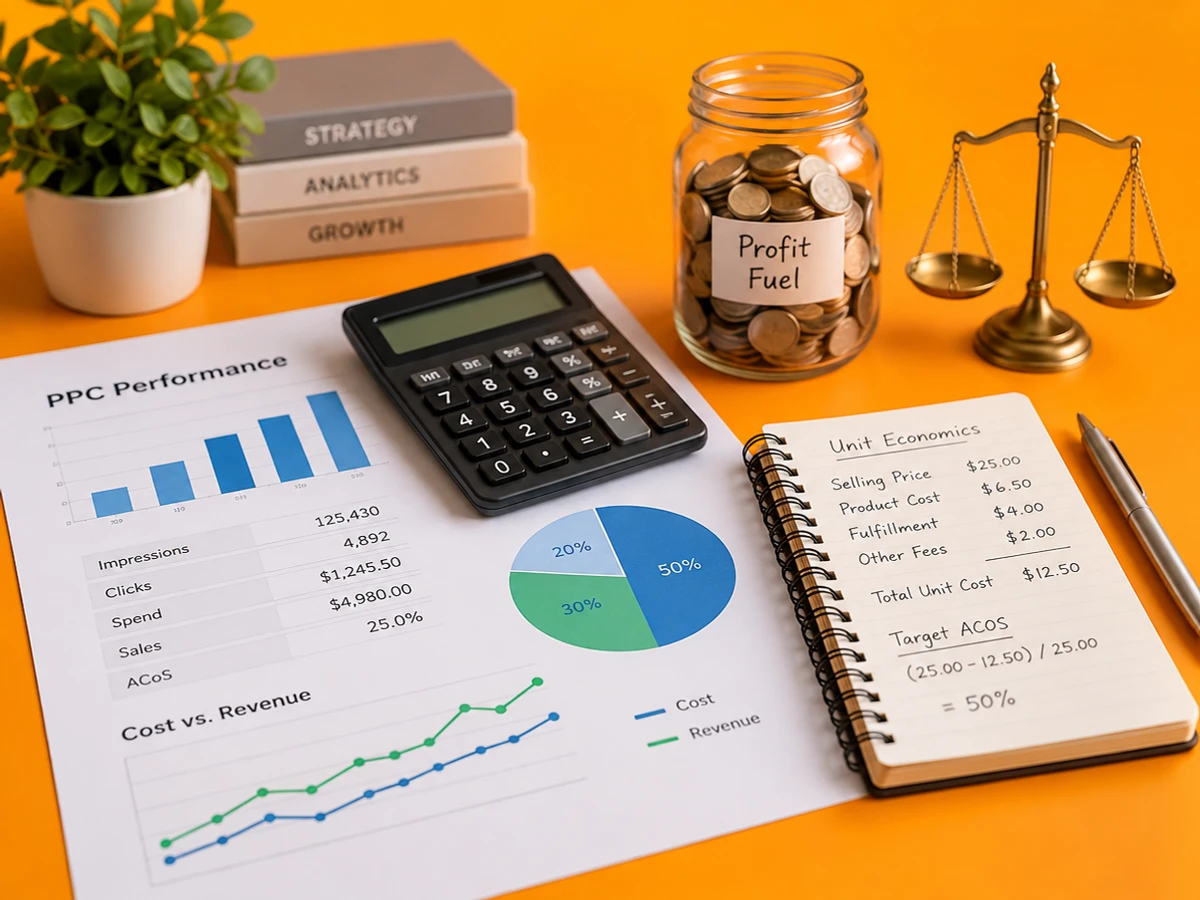
Your break-even ACoS is the highest ACoS where you still break even. Every point above it is a loss, and every point below it is profit. Written out: Break-even ACoS = (Sale Price minus All Non-Ad Costs) divided by Sale Price, times 100.
Best Practices
- Calculate break-even ACoS per SKU, not per brand or account. Margins vary too much for one blended number to be useful.
- Keep the calculation in the same spreadsheet as your cost sheet so it updates automatically when fees change.
What Done Looks Like
You can name one break-even percentage per product, and you know that spending above it on ads loses money, however much revenue those ads bring in.
Example
Using the Step 1 numbers: contribution margin = $40.00 – $26.50 = $13.50. Break-even ACoS = ($13.50 / $40.00) x 100 = 33.75%. A documented worked example uses a $40 product with $24.50 in total unit costs, giving a $15.50 contribution margin and a 38.75% break-even ACoS. Different inputs, same formula.
Step 3: Set a Target ACoS Below Break-Even
Break-even is where you stop losing money, but nobody runs a business to break even. Your target ACoS leaves room for profit after ads are paid for.
What You’re Doing
You’re choosing an ACoS that keeps the profit margin you want after ad spend.
How to Do It
- Decide how much profit you want to keep after advertising, commonly 10 to 20%.
- Subtract that margin from your break-even ACoS.
- The result is your target ACoS, the number you actually steer bids toward.
The math: Target ACoS = Break-Even ACoS minus Target Profit Margin. If break-even ACoS is 30% and you want to keep 15% profit, your target ACoS is 15%.
Best Practices
- Check your target against the category benchmark before locking it in. A target that ignores category norms can be unrealistically aggressive.
- Expect wide differences between verticals. 2026 category data shows typical ACoS ranges of 20% to 28% in Beauty and Personal Care, 18% to 25% in Grocery and Gourmet Food, and 22% to 30% in Health and Household and Home and Kitchen.
What Done Looks Like
Each SKU has a hard break-even ceiling and a target ACoS you actively manage bids toward, with enough space between them to hold your profit.
Step 4: Convert Break-Even ACoS into Bids and Budgets
A percentage doesn’t set a bid by itself. This step turns your target ACoS into a real maximum cost-per-click you can enter in Amazon.
What You’re Doing
You’re translating your target ACoS into a maximum bid for each keyword.
How to Do It
- Pull the average order value (AOV) and conversion rate (CVR) for the keyword or campaign.
- Apply the bid formula: Max CPC = Target ACoS x CVR x Price.
- Enter that figure as your bid ceiling in the Amazon Advertising Console or your bidding software.
- For a hard stop-loss figure, run the same calculation using break-even ACoS instead of target ACoS.
As one 2026 PPC framework puts it, a good Amazon bid is a calculation, not a feeling. Your margin sets break-even, your goal sets a target below it, and your conversion rate turns that target into a precise maximum bid.
Common Mistakes
The most common mistake is setting bids from Amazon’s suggested range instead of your own math. That’s how accounts end up running well above break-even for weeks before anyone notices.
What Done Looks Like
Every active keyword has a documented maximum bid based on your own margin.
Step 5: Monitor and Recalculate as Costs Change
Break-even ACoS isn’t a one-time calculation. Fee changes, COGS swings, and rising returns all move your margin, and your break-even point moves with them.
What You’re Doing
You’re setting up a routine that keeps break-even and target ACoS accurate.
How to Do It
- Rerun the Step 1 and Step 2 calculations monthly, or right after any Amazon fee update.
- Flag any keyword running well above target. A common rule is to pause or cap any target running at 2x break-even ACoS for 14 or more days, or 7 days in competitive niches.
- Lower bids right away if COGS or referral fees rise, since your break-even ceiling drops with them.
What Done Looks Like
Break-even and target figures are reviewed on a set schedule and are never more than one fee cycle out of date.
What to Do After Calculating Break-Even ACoS
Phase 1: Apply it across the account. Run the calculation for every active SKU, not just bestsellers. A quiet money-loser often hides in the long tail.
Phase 2: Build a bidding rhythm. Set a weekly or biweekly bid review using target ACoS as the benchmark. Raise bids on winners and pull back on keywords drifting toward break-even.
Phase 3: Protect the account that runs your campaigns. A great PPC strategy doesn’t help if your seller account gets suspended mid-campaign. The Appeal Guru fits into a seller’s bigger operating plan. The team believes every honest seller deserves a fair chance to operate and grow their e-commerce business, and offers personalized support for marketplace suspensions and complex reinstatement cases.
Resources You’ll Need
| Resource | Role | Required / Recommended / Optional | Price |
|---|---|---|---|
| Amazon FBA Revenue Calculator | Pulls accurate referral and fulfillment fees per SKU | Required | Free |
| Amazon Advertising Console | Where you enter calculated bids and monitor ACoS | Required | Free (pay per click) |
| Seller Sprite PPC Revenue Calculator | Speeds up break-even and true profit calculations | Recommended | Free tier available |
| Ad Badger | Benchmark comparison and PPC optimization guidance | Optional | Paid plans |
| The Appeal Guru | Reinstatement support if a suspension interrupts your PPC operations | Recommended (situational) | Appeals from $1,495 USD |
See also, see What Is a Good ACOS on Amazon? How to Calculate It.
Common Plateaus & How to Break Through
Problem: My ACoS looks fine, but I’m still not profitable
Likely cause: You’re comparing actual ACoS to a generic benchmark instead of your own break-even number.
Fix: Recalculate break-even ACoS per SKU using Steps 1 and 2, and compare actual ACoS only against that number.
Problem: Break-even ACoS keeps shifting, and my bids feel out of date
Likely cause: Fee changes, rising COGS, or higher return rates are eating into margin, and bids haven’t caught up.
Fix: Rebuild the cost sheet from Step 1 every month and recalculate break-even ACoS whenever a fee schedule updates.
Problem: A category benchmark calls my ACoS “bad,” but the math says I’m profitable
Likely cause: Benchmarks vary enormously. Median ACoS runs from about 23% in Food and Grocery to 57% in Clothing and Apparel, so one platform average isn’t a reliable yardstick.
Fix: Trust your own break-even calculation over generic benchmarks. Benchmarks give context, not a verdict.
Problem: My account was suspended, and I can’t manage PPC at all
Likely cause: Policy violations, listing problems, or performance flags unrelated to advertising can freeze your whole selling account.
Fix: Get specialist help with a Plan of Action as soon as possible. The Appeal Guru is a dedicated Amazon suspension appeal specialist, focused on helping sellers regain access to their accounts quickly and confidently, with custom Plan of Action letters, invoice verification, Brand Registry, listing reinstatement, digital marketing, and FBA partnership solutions.
Key Takeaway: Base profitability decisions on your own break-even ACoS, update calculations whenever costs change, trust your data over generic benchmarks, and get expert help quickly if your account is suspended. For more troubleshooting advice, see What Is a Good Amazon ACOS in 2026? When High ACOS Is ….
Conclusion
Once you know how to calculate break-even ACoS for Amazon PPC campaigns, advertising stops being a guessing game and becomes a system that protects your margin. With a break-even ceiling, a target ACoS below it, and bids built on real math, every campaign decision becomes easier to defend and repeat.
Key Takeaways
- Break-even ACoS equals your contribution margin before advertising, expressed as a percentage of sale price.
- Target ACoS, not break-even ACoS, is the number you should actively steer bids toward.
- Recalculate regularly, and keep your seller account protected so your PPC strategy can actually run.
FAQ
How do I calculate break-even ACoS for Amazon PPC in 2026?
Subtract all non-advertising costs (COGS, the referral fee, the FBA fulfillment fee, and other variable costs) from your sale price to get your contribution margin. Divide that margin by the sale price and multiply by 100. For example, a $40 product with $26.50 in total unit costs has a break-even ACoS of 33.75%. Recalculate for each SKU whenever fees or product costs change.
What is a good break-even ACoS for Amazon PPC campaigns?
There’s no universal number, because break-even depends on your margin. A high-margin product might have a break-even ACoS of 50%, while a thin-margin product might only reach 20%. What matters is comparing your actual ACoS against your own break-even number, not an industry average.
What is the difference between break-even ACoS and target ACoS?
Break-even ACoS is the ceiling where a sale produces zero profit after ad spend. Target ACoS is break-even ACoS minus the profit margin you want to keep. Target ACoS always sits below break-even ACoS to leave room for real profit.
What is the average ACoS for Amazon PPC campaigns in 2026?
Compiled 2026 benchmark data puts the platform-wide average at roughly 29% to 32% on Sponsored Products data, though some datasets land closer to 34%. It varies widely by category, so treat the average as a loose reference point, not a target.
How do I turn break-even ACoS into an actual PPC bid?
Multiply your target ACoS by your conversion rate and your average sale price to get a maximum cost-per-click. Enter that number as your bid ceiling in the Amazon Advertising Console instead of relying on Amazon’s suggested range.
How often should I recalculate my break-even ACoS?
Recalculate at least monthly, and right away after any change to Amazon’s referral or FBA fees, your COGS, or a noticeable shift in your return rate. Any of these can move your break-even point by several percentage points.
Does break-even ACoS differ for Amazon vendors and sellers?
Yes. For first-party vendors, break-even ACoS should be based on Amazon’s selling price rather than your wholesale price, because Amazon attributes ad sales to what it charges the end customer. This usually produces a different percentage than a third-party seller calculation for the same product.
Can a suspended Amazon account still run break-even ACoS calculations?
You can still do the math, but you can’t act on it while advertising access is frozen. Reinstating the account comes first. Specialists such as The Appeal Guru build custom Plans of Action to restore selling and advertising privileges, so profitable PPC campaigns can run again.
This guide was compiled using publicly available 2026 Amazon advertising benchmark data, standard PPC industry formulas, and operational insight from e-commerce account management professionals. Figures and category benchmarks cited are approximations drawn from third-party industry reports current as of late 2026 and may vary by individual account, category, and marketplace conditions. Verify current fees directly in Seller Central before finalizing bids.